
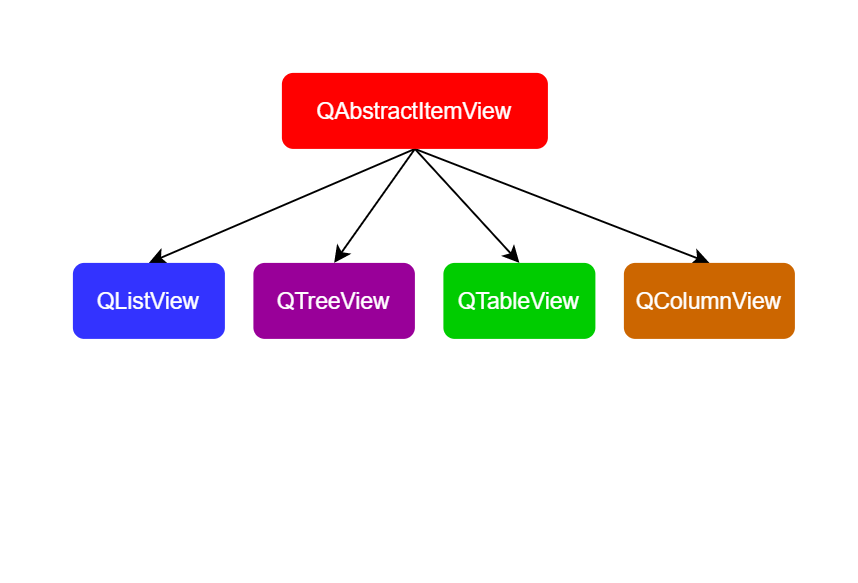
先调用 View的drawRow,再调用代理的 paint
QTreeView::paintEvent()
 └─ QTreeView::drawTree()
     └─ 对每个可见 row:
         ├─ drawBranches()        // 画树枝/展开箭头
         ├─ drawRow()             // 行级绘制钩子(你能重写)
         │   └─ 对该行的每个 column:
         │       └─ delegate->paint()   // 单元格绘制
每一个 view 有一个SelectionModel
QItemSelectionModel *sm = view->selectionModel();
Widget 在数据量大的时候容易卡,推荐使用View。
QListWidget、QTreeWidget和QTableWidget 这 3 个用于处理项数据的组件是它们对应的子类,叫做便利类,没有模型,用项的方式代替了模型的功能,因此缺乏了对大型数据源的灵活处理的能力。
视图模型架构:
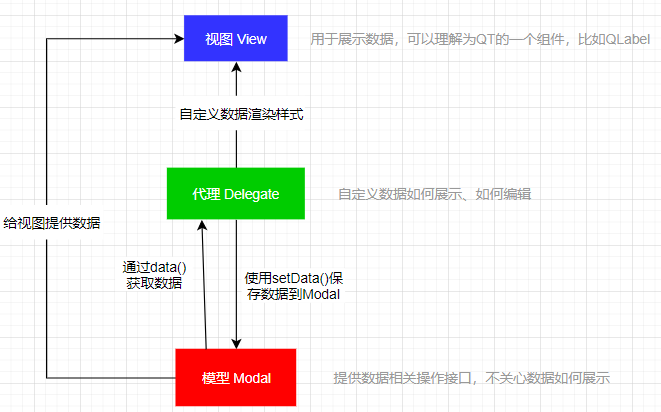
View:负责展示
Delegate:怎么画/怎么编辑
Model:负责数据处理
数据模型 Model
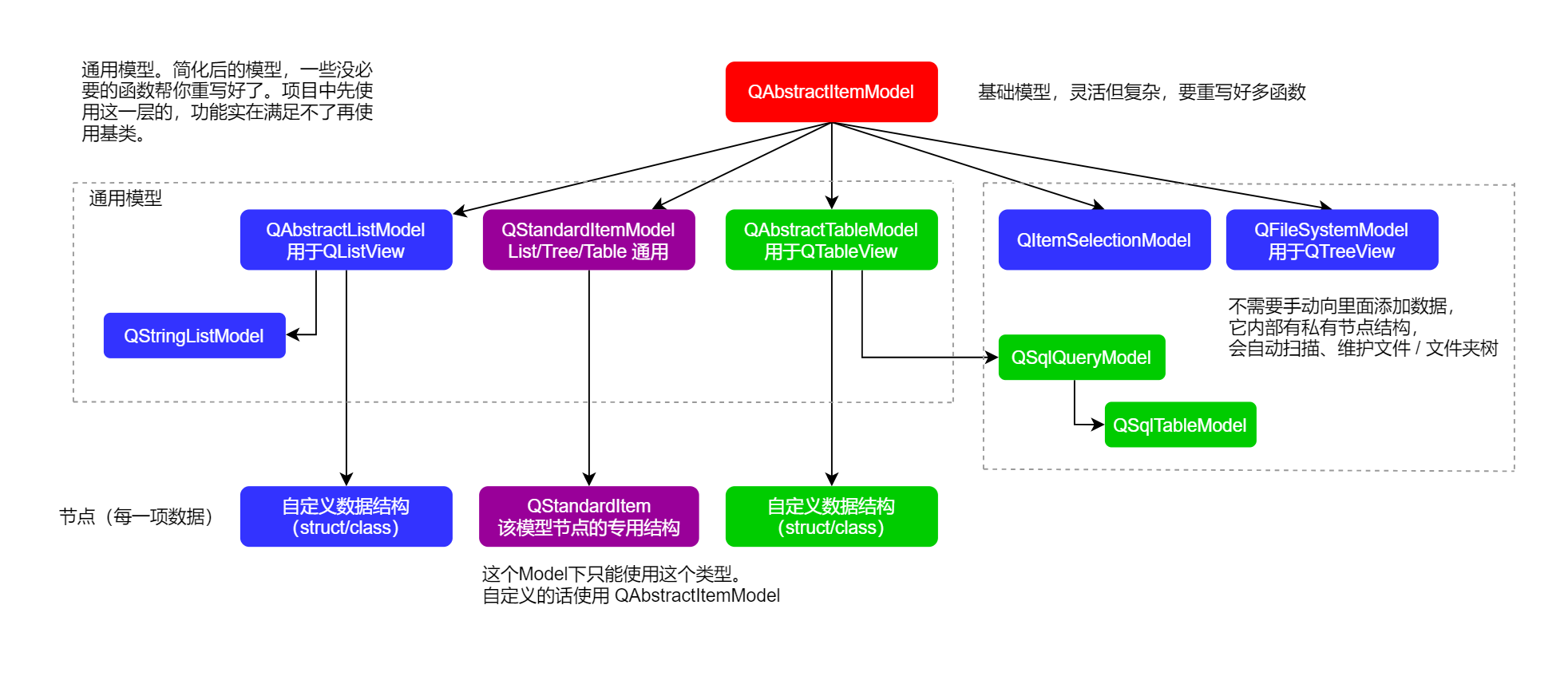
索引 QModelIndex
特定行和特定列上的数据有唯一标识(ID),即 QModalIndex
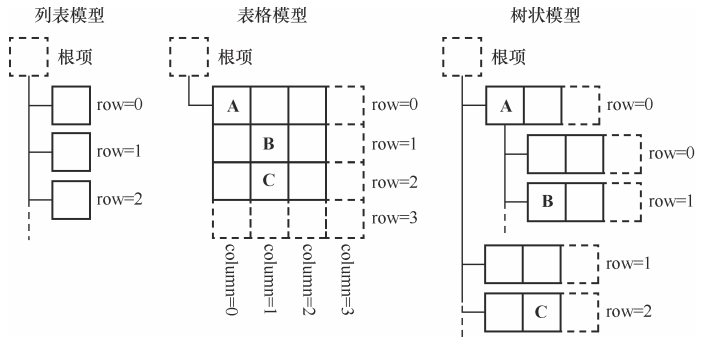
角色 Role
role
角色是view或代理传过来的,要某一种数据。
view的话,就是固定的,代理的话可自定义role
flags 控制某个item可执行的操作。
自定义代理
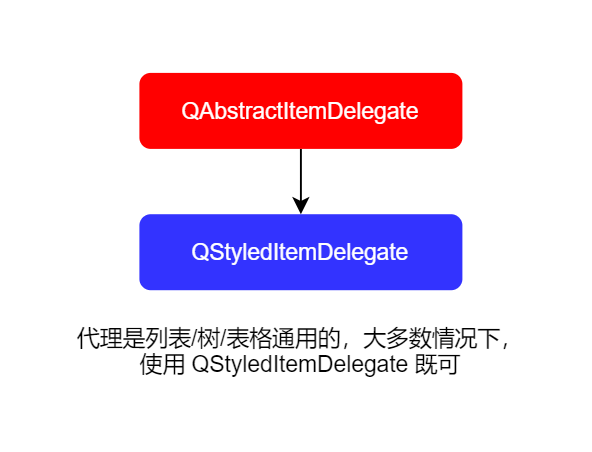
QStyledItemDelegate:
// 自定义更新数据的编辑器 QWidget *createEditor(QWidget *parent, const QStyleOptionViewItem &option, const QModelIndex &index) const override;// 从Model中获取数据
void setEditorData(QWidget *editor, const QModelIndex &index) const override;// 保存数据到Model中
void setModelData(QWidget *editor, QAbstractItemModel *model, const QModelIndex &index) const override;// 自定义编辑器的位置和大小
void updateEditorGeometry(QWidget *editor, const QStyleOptionViewItem &option, const QModelIndex &index) const override;bool eventFilter(QObject *editor, QEvent *event) override;
// 自定义数据如何展示
void paint(QPainter *painter, const QStyleOptionViewItem &option, const QModelIndex &index) const override;
// 自定义数据单元的大小
QSize sizeHint(const QStyleOptionViewItem &option, const QModelIndex &index) const override;
列表
树
若是继承了 QAbstractItemDelegate,他没有默认的样式,需要自己实现,不像 QStyledItemDelegate 那样。
在 QStyledItemDelegate 中实现系统默认绘制:
void paint(QPainter *painter, const QStyleOptionViewItem &option, const QModelIndex &index) const override
{
bool useCustom = index.data(Qt::UserRole + 1).toBool();if (useCustom) { // 自定义绘制 painter->fillRect(option.rect, Qt::yellow); painter->setPen(Qt::black); painter->drawText(option.rect, Qt::AlignCenter, "Custom Drawn"); } else { // 条件不满足时,调用基类 => 使用系统默认样式绘制 QStyledItemDelegate::paint(painter, option, index); } }</code></pre><p style=""></p><p style="">QTreeView 可实现:</p><ul><li><p style="">无列的显示(通常)</p></li><li><p style="">像 QTableView 那样有列的显示</p></li></ul><p style=""></p><p style=""></p><p style=""></p><h1 style="" id="table-%E8%A1%A8%E6%A0%BC">Table 表格</h1><p style="">QAbstractItemModel:</p><p style=""></p><p style="">一般重写这几个:</p><pre><code>int rowCount(const QModelIndex &parent) const override;
int columnCount(const QModelIndex &parent) const override;
QVariant data(const QModelIndex &index, int role) const override;
virtual QVariant headerData(int section, Qt::Orientation orientation, int role = Qt::DisplayRole) const;
这些函数用于通知状视图刷新,否则可能出现数据错乱和诡异的bug,必须成对出现。
void endInsertColumns() void endInsertRows() void endMoveColumns() void endMoveRows() void endRemoveColumns() void endRemoveRows() void endResetModel()QAbstractItemModel 里的信号分两类:
① 框架内部自动触发的(调用 begin/end 这些函数中触发的)
② 业务数据相关的,必须你手动触发
emit dataChanged(topLeft, bottomRight, roles);

emit headerDataChanged(orientation, first, last);

emit layoutAboutToBeChanged();

emit layoutChanged();
QAbstractTableModel:
bool QAbstractTableModel::dropMimeData(const QMimeData *data, Qt::DropAction action, int row, int column, const QModelIndex &parent)

Qt::ItemFlags QAbstractTableModel::flags(const QModelIndex &index) const

QModelIndex QAbstractTableModel::index(int row, int column, const QModelIndex &parent = QModelIndex()) const

QModelIndex QAbstractTableModel::sibling(int row, int column, const QModelIndex &idx) const
dropMimeData:有数据拖拽到当前 Model 时怎么处理这个数据(松手时)
flags:单元格的操作
index:给我 (row, column),我给你一个 QModelIndex,这个一般不需要重写
sibling:在同一层级,跳到同一行/列的另一个 index
继承 QAbstractTableModel 需要重写: